Hospital IT Infrastructure Checklist Before HIMS Go-Live
Published
Most HIMS go-lives that wobble do not fail on software. They fail on a Wi-Fi dead spot outside the ICU, a label printer that prints tube labels 2 mm too wide for the analyzer's reader, a UPS that lasts four minutes when the generator takes six to pick up, or a billing counter with one computer and three billing clerks. Each is cheap to fix in week minus six and expensive on day one.
This article is for the hospital IT head, or the administrator who has inherited IT, preparing for a new hospital information system. Our HMIS go-live guide covers process and people. This one covers infrastructure: network and Wi-Fi, power, printers and scanners, devices by department, the time and logging baseline, and a test plan. The device counts are illustrative; build your own using the method.
Network and Wi-Fi coverage by area
Start with a walk through the building with a floor plan, a laptop and the actual tablet or phone your nurses will use. Coverage maps from the vendor are a starting point, not proof.
Check these areas in particular:
- Wards and nurse stations: coverage at the bedside, not just at the station, if nurses will chart or scan wristbands at the bed.
- ICU and HDU: many devices in a small area, and staff who cannot wait for a page to load.
- Operation theatres: thick walls and steel doors often block signal. Plan wired points for theatre workstations.
- Radiology: lead-lined walls block Wi-Fi. Reporting and modality workstations should be wired anyway.
- Basements and stores: pharmacy stores and CSSD are often underground and forgotten in the survey.
- Casualty and registration: peaks of load and walk-in users on guest Wi-Fi.
- Lifts and stairwells: only if staff will use devices while moving between floors.
Design principles
- Wire every fixed workstation, printer and analyzer. Use Wi-Fi for mobile devices only.
- Separate networks for clinical systems, medical devices, administration and guest Wi-Fi, so a patient's phone never shares a network with a lab analyzer.
- Two internet links from different providers, ideally entering the building by different routes, with automatic failover. If the HIMS is cloud-hosted, the internet link is now a clinical utility.
- Estimate bandwidth from concurrent users and imaging, and ask your vendor for per-user figures measured on their system. Screens for registration and billing move small amounts of data; pulling a CT study across the link moves far more, so size the link for imaging peaks, not for billing screens.
- Put network switches for each floor on UPS, not just the server room. A ward with power and no switch is a ward without HIMS.
Power and UPS
Hospitals already run generators. The gap is usually the seconds and minutes between mains failure and generator power, and what the IT equipment does in that gap.
- Measure the generator changeover time, do not assume it. Then size UPS runtime to cover it with a margin, plus enough time for a clean shutdown if the generator fails to start.
- Use online UPS for the server or network room and for each floor's network rack.
- Put critical counters on UPS: registration, casualty, billing at discharge, pharmacy, lab sample collection and the ICU nurse station.
- Check earthing at every new workstation location. Poor earthing shows up as random hardware faults that look like software bugs.
- Label every UPS with its load, runtime and battery replacement date, and put battery replacement in the maintenance calendar.
NABH's 6th edition standards for hospitals expect alternate sources of electricity and water to be provided and their functioning tested at a predefined frequency (FMS.2). Fold the IT UPS tests into that same schedule so they are recorded together. The 6th edition also extends the interpretation of IMS.1.e to cover monitoring of system downtime, so log every outage with its start, end and cause from day one.
Printers, label printers and scanners
Printing is where clinical workflow meets physical media, and small mismatches stop work.
- A4 laser printers: reports, discharge summaries, consent forms and bills. Share one between two or three consultation rooms, but give billing and discharge their own.
- Thermal receipt printers: OPD tokens, receipts and pharmacy bills at counters.
- Sample tube label printers: at every collection counter and the ward sample point. The label size must match the tubes you buy and the analyzer's barcode reader. Test with the analyzer before you buy 50 rolls.
- Wristband printers: at admission, casualty and the labour ward, with wristband media that survives a bath and an alcohol wipe.
- Pharmacy and stores label printers: for batch and expiry labels on repacked items and for bin locations.
- Barcode scanners: 2D scanners at pharmacy, stores, sample receiving in the lab and at the bedside if you scan wristbands. 2D reads both linear barcodes and QR codes, which keeps options open.
- Document scanners: at registration and the insurance desk, for ID documents, referral letters and pre-authorisation papers.
Keep a consumables list: label rolls, ribbons, wristbands, toner, with a reorder level in stores like any other item.
The device-count calculator
A per-bed rule of thumb hides where the devices actually go. Count by department, by counter and by shift peak. Here is the method, with illustrative ratios and a worked example for a 100-bed multispecialty hospital with 30 OPD rooms.
Ratios to start from (adjust to your layout)
- OPD registration: 1 computer, 1 thermal printer and 1 document scanner per counter.
- Consultation rooms: 1 computer per room, 1 A4 printer per 2 to 3 rooms.
- Ward nurse stations: 2 computers per 30-bed ward, plus 1 A4 printer and 1 wristband or label printer per station.
- Bedside charting (optional): 1 tablet per 6 to 8 beds per shift.
- ICU: 1 computer per 4 to 6 beds, plus the station.
- Lab: 1 computer and 1 tube label printer per collection counter, 1 computer per lab section, 1 at sample receiving with a scanner.
- Pharmacy: 1 computer, 1 2D scanner and 1 thermal printer per counter, plus 1 in the store.
- Billing and insurance desk: 1 computer per clerk on the busiest shift, 1 A4 printer per 2 clerks, 1 document scanner at the insurance desk.
- Radiology: reporting workstations with diagnostic-grade monitors per radiologist, 1 computer at each modality console and the front desk.
- OT: 1 computer per theatre and 1 at the OT reception.
- Stores, kitchen, housekeeping, biomedical: 1 each.
- Administration, HR, accounts, MRD and quality: 1 per staff member who uses the system daily.
Worked example (illustrative, 100 beds)
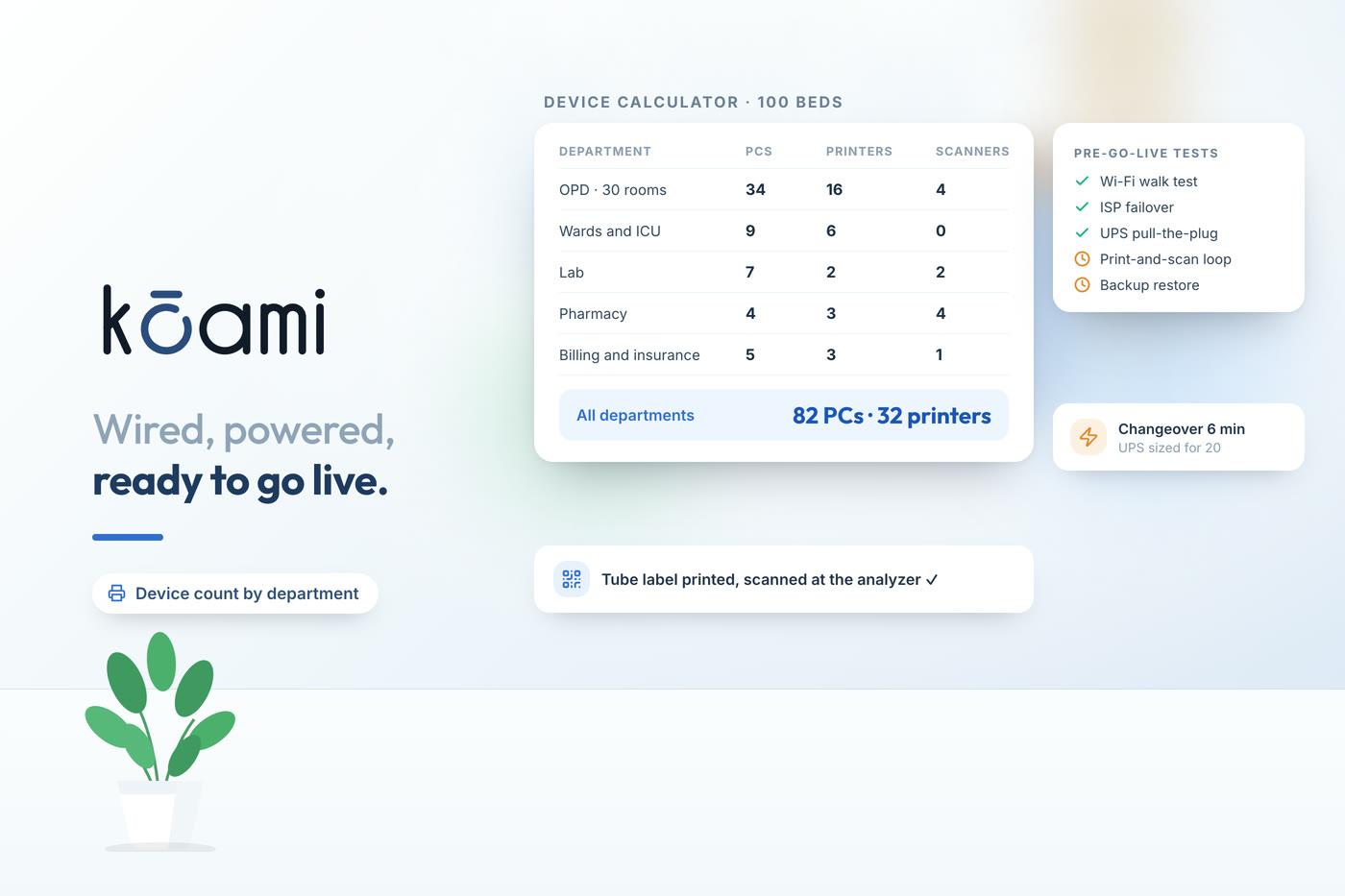
- OPD: 4 registration counters and 30 consultation rooms: 34 computers, 4 thermal printers, 4 document scanners, 12 A4 printers.
- Wards: three 30-bed wards: 6 computers, 3 A4 printers, 3 label or wristband printers.
- ICU: 10 beds: 3 computers.
- Casualty: 2 computers, 1 wristband printer, 1 A4 printer.
- Lab: 2 collection counters and 4 sections: 7 computers, 2 tube label printers, 2 scanners.
- Pharmacy: 3 counters and a store: 4 computers, 4 scanners, 3 thermal printers.
- Billing and insurance: 5 clerks on the peak shift: 5 computers, 3 A4 printers, 1 document scanner.
- Radiology: 2 reporting stations and 3 consoles: 5 computers.
- OT: 3 theatres plus reception: 4 computers.
- Support departments: 4 computers. Administration and accounts: 8 computers.
That totals 82 computers, 32 printers (19 A4, 7 thermal, 6 label, tube or wristband), 6 barcode scanners and 5 document scanners, before tablets for bedside charting and before barcode scanners at the bedside if you scan wristbands. Add 10% spare devices, kept configured, for failures during the first month.
Time, logs and the security baseline
Some infrastructure decisions are also compliance decisions.
- Time: CERT-In's April 2022 directions require entities to synchronise ICT system clocks with the NTP servers of the National Informatics Centre or the National Physical Laboratory, or with servers traceable to them. Accurate time matters clinically too: medication administration and critical result timestamps are evidence.
- Logs: the same directions require logs of ICT systems to be kept securely for a rolling 180 days within India, and specified cyber incidents to be reported within 6 hours. Plan log storage now.
- Privacy safeguards: Rule 6 of the DPDP Rules, 2025, which comes into force in May 2027, lists minimum safeguards including encryption or masking, access control, logs and monitoring, backups, and keeping logs for one year. Building toward it now is cheaper than retrofitting.
- Accounts and access: named accounts for every user, no shared logins at counters, and multi-factor authentication for remote and administrator access. Our article on MFA for clinicians covers how to do this without slowing the ward.
The pre-go-live test plan
Run these tests in the last four weeks, with a named owner and a pass or fail for each:
- Wi-Fi walk test: every ward, ICU, OT, casualty and store, using the actual devices, logging into the HIMS and opening a patient record.
- Internet failover: unplug the primary link during a busy hour of a mock session and confirm sessions survive.
- Power test: cut mains to a floor and confirm the network rack and critical counters stay up until the generator takes over.
- Print test: print every document type from every workstation to its mapped printer.
- Print-and-scan loop: print each label type and scan it where it will be read: tube labels at the analyzer, wristbands at the bedside, batch labels at the pharmacy counter.
- Load test: simulate the OPD morning peak with real users on real devices at the same time.
- Backup and restore: restore a backup to a test environment and open records from it. A backup you have never restored is a hope, not a backup.
- Downtime drill: switch to paper fallback forms for 30 minutes and back, including back-entry. Our downtime resilience guide covers the fallback kit.
Where software fits
Infrastructure and software choices interact. A cloud-hosted system moves the server room out of the building but makes the internet link and floor-level network a clinical utility; an on-premise system keeps the server room and its UPS, cooling and backups on your side. Kōami is a cloud system, with on-premise and hybrid hosting options on its enterprise plan, so the checklist above applies either way. Our HMIS product page shows what runs on it, and our article on cloud vs on-premise hosting sets out the trade-offs honestly.
If you would like a pre-go-live infrastructure review against your floor plan and device list, we can walk through it with you. Book a demo: koami.in/book-demo
Frequently asked questions
- How many computers does a 100-bed hospital need for HIMS?
- It depends on the departments and how many counters run at once, but the illustrative worked example in this article comes to about 82 computers, 32 printers of various types and 11 scanners for a 100-bed multispecialty hospital with 30 OPD rooms, before bedside tablets. Build your own count department by department rather than using a per-bed rule.
- Which barcode printers does a hospital need?
- Usually three kinds: sample tube label printers at collection counters, wristband printers at admission and casualty, and label printers for pharmacy and stores. Each needs the right media size and a scanner that reads the printed label reliably.
- How long should hospital UPS backup last?
- Long enough to cover the generator changeover with a margin, and long enough for network and server equipment to keep running if the changeover fails once. Size it from the actual load and the measured changeover time, then test it by cutting mains power before go-live.
- Does CERT-In apply to hospital IT systems?
- CERT-In's April 2022 directions apply to service providers, intermediaries, data centres, body corporates and government organisations. They require ICT clocks to be synchronised with NIC or NPL time servers or sources traceable to them, specified incidents to be reported within 6 hours, and logs to be kept for a rolling 180 days within India. Most private hospitals are body corporates.
- What should a hospital IT test plan include before go-live?
- A Wi-Fi walk test with real devices, internet failover, a UPS and generator test, a print test from every workstation, a print-and-scan test for every label type, a load test with simulated users, a backup restore and a downtime drill using the paper fallback forms.
Sources
- CERT-In: Directions under section 70B(6) of the IT Act, 28 April 2022 (NTP sync, 6-hour reporting, 180-day logs)
- Gazette of India: Digital Personal Data Protection Rules, 2025, G.S.R. 846(E), Rule 6 security safeguards
- NABH: Accreditation Standards for Hospitals, 6th Edition (effective 1 January 2025), FMS.2 and IMS.1
Follow Kōami on LinkedIn
Get the next guide on hospital operations, software and compliance in your feed, as soon as it is published.